

RGB Ergonomic Vertical Mouse 2.4G Wireless & Bluetooth Wired Tri-Mode Design Rechargeable Optical Mouse with Removable Wrist Rest 6 Buttons Compatible with PC, Laptop, Desktop, MacBook, Tablets
Product details
| Management number | 228908483 | Release Date | 2026/05/31 | List Price | US$10.40 | Model Number | 228908483 | ||
|---|---|---|---|---|---|---|---|---|---|
| Category | |||||||||
The mouse is a tri-mode, four-channel device. It offers three modes of operation: wired, 2.4G wireless, and Bluetooth. Additionally, it has four channels: wired, 2.4G wireless, Bluetooth 1, and Bluetooth 2. 【In wired mode】, the mouse is connected to the computer via a data cable. This forces the mouse to operate in this mode. To switch to wired mode, simply press the channel indicator and the long, bright red light will illuminate. Please note that if the connection line does not have the data function, the mouse will only show the charging status and the bottom mode light will default to the last channel. The bottom of the mouse mode switching function can be used normally. 【2.4G mode】: To switch to wireless mode, press the button and the indicator light will turn red. The receiver will be identified automatically with a long or short press, eliminating the need for a code. 【In Bluetooth mode】: pressing the bottom switch will switch channels and return the device to the last connected device. If no device is connected, the BLE signal will be broadcast, indicated by a slow flash, and the mode light will turn off. To enter the mandatory code pairing state and connect to a Bluetooth channel, press and hold the switch. The mode indicator will flash rapidly, and after connecting successfully, the mode indicator light will turn off. Please note that the Bluetooth mode has two channels: BT1 with a blue light and BT2 with a green light. -------------------------------------------------------------------------------------------------------------- 【RGB indicator light function】 1.The RGB indicator light has 7 modes, 6 of which are used to display different colours. The 7th mode is used to close the RGB light function. 2. When the RGB mouse is in charging mode, only the red light will be illuminated. The other lights will remain off. 3. If the RGB lights are connected to a device and the device is not receiving a signal for a certain period of time, the RGB lights will automatically turn off. This is to conserve battery life. When the device is in use, the lights will turn on again. ********Please note that the mouse will flash red when the power is below a certain level. When charging, the red light will illuminate, and when fully charged, the green light will be on. It is important to highlight that the mouse can operate normally while charging.
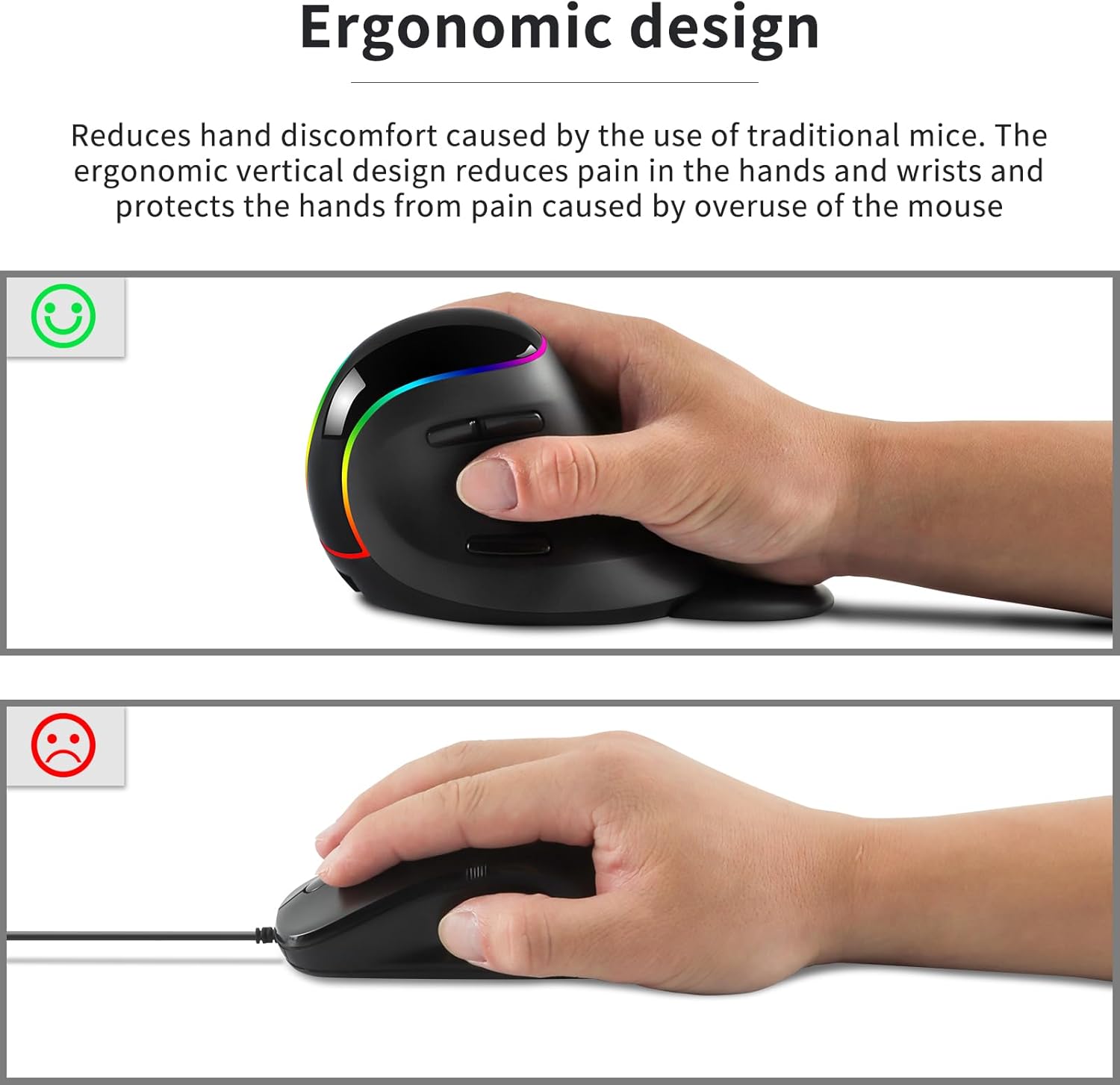
- Ergonomic Design: Crafted for optimal comfort, this vertical mouse promotes a neutral "handshake" wrist and arm position, reducing strain during prolonged use and helping alleviate carpal tunnel symptoms.
- Stable Wireless Connection: Experience a robust and reliable connection with advanced 2.4GHz technology, Bluetooth (BT1/BT2), and wired modes. Enjoy the freedom from cable clutter while maintaining an effective range of up to 10 meters (33 feet).
- Adjustable DPI Settings: Customize your experience with four available DPI settings (800, 1200, 1600, 2400). Easily switch between these options to tailor the mouse's sensitivity and responsiveness to suit your gaming or working needs.
- Stylish RGB Lighting: Experience customizable RGB lighting that adds flair to your setup. Choose from multiple color options to create an aesthetically pleasing workspace or gaming environment.
- Wide Compatibility: This wireless vertical mouse is fully compatible with various operating systems, including Windows 7/8/10/XP, Vista 7/8, Linux, and Mac OS. It is designed for use with desktops, laptops, PCs, iPads, tablets, MacBooks, and other devices with USB ports and Bluetooth capability, making it perfect for both work and entertainment.
- Removable Palm Rest: Personalize your comfort with a detachable palm rest; easily remove it based on your preference for additional convenience and support.
- Convenient Thumb Buttons: Enhance your workflow with strategically placed back/forward buttons near the thumb area, making navigation seamless and efficient during both work and play.
| ASIN | B0CSMP2PKF |
|---|---|
| Brand | Samudgate |
| Color | Black |
| Range | 33.0 feet |
| Theme | Rainbow |
| Finish | Smooth |
| Model Name | Samudgate |
| Style Name | Modern |
| Unit Count | 1.0 Count |
| Item Weight | 184 Grams |
| Manufacturer | Samudgate |
| Model Number | 13b4b062-e059-4c61-bc21-f4c2ac3390d5 |
| Power Source | Battery Powered |
| BuiltIn Media | 1 x USB Cable |
| Button Quantity | 6 |
| Antenna Location | Indoor/Outdoor |
| Hand Orientation | Right |
| Operating System | Linux |
| Compatible Devices | Personal Computer |
| Enclosure Material | Plastic |
| Movement Detection | Optical |
| Additional Features | Ergonomic Design, Wireless |
| Number of Batteries | 1 Lithium Ion batteries required. (included) |
| Are Batteries Included | Yes |
| Are Batteries Required | Yes |
| Connectivity Technology | Radio Frequency |
| Mouse Maximum Sensitivity | 2400 Dots per Inch |
| Minimum Required Operating System Version | Windows 7 |



Bestseller ranking
Car Racks & Carriers

Customers who viewed this product also viewed
Gaming Mice




Correction of product information
If you notice any omissions or errors in the product information on this page, please use the correction request form below.
Correction Request Form